How to Make a Hotel Lobby Video on Higgsfield
Genjutsu works from existing footage. Higgsfield’s official overview describes Motion Transfer as rebuilding the scene around the source motion and camera, while Object Swap targets selected elements. Here is how those options apply to an orange-booth performance.
Start from a Recreate example, if one is available
Higgsfield displays Recreate links beside Genjutsu examples. If you find a suitable Hotel Lobby post, open its setup and check which video and photo references it uses before substituting your own. A relevant community example is a starting point, not a guaranteed permanent preset.
Use Motion Transfer with a reference clip
- Open Genjutsu — Select Motion Transfer.
- Add your references — Upload a permitted video and photos of the intended performers.
- Check settings and cost — Choose a preset or short description, set quality and review the credit cost.
- Generate and review — Compare with the source, then export.
This follows Higgsfield’s published Genjutsu workflow. We checked the documentation on October 7, 2026; we have not tested a paid Hotel Lobby render or confirmed a specific live community template.
What to Check Before Spending Credits
First decide what you want to keep. Is it the exact gesture at a particular moment, or just the orange booth and a recognizable friend duo? For the first goal, choose source footage that actually contains that movement. For the second, preparing a reference video adds work you may not need.
- Both performers: inspect the full preview, not just the opening frame. Check that the intended person appears on each side and neither face changes unexpectedly when they turn.
- Sound: listen before exporting. A video that resembles the original performance does not establish which recording it uses or whether the mouths match the audio.
- Cost: check the amount for your selected settings before each attempt. Budget for another render if your first completed result needs improvement.
- Missing template: do not keep searching for a button shown in an old tutorial. Use a reference clip you can supply, or switch to the photo workflow below.
A Simpler Way: Your Photos, No Reference Video
Hotel Lobby AI is for creating a new duo performance. You provide the people and choose the scene; you do not have to find an existing performance to edit. Here is a concrete setup for a short birthday clip.
1. Upload separate portraits or one photo of both
Open the Hotel Lobby video maker. Select Two photos if your pictures were taken separately: put the person you want on the left in Person 1 and the person on the right in Person 2. Select One photo of both for a picture with exactly two people side by side; the person on the left is directed to start the rap.
Use clear, evenly lit faces without sunglasses or heavy blur. JPG, PNG and WEBP are supported, up to 20 MB per file. A crowded group photo makes the intended cast unclear; choose a cleaner image. The photo selection guide shows what to check.
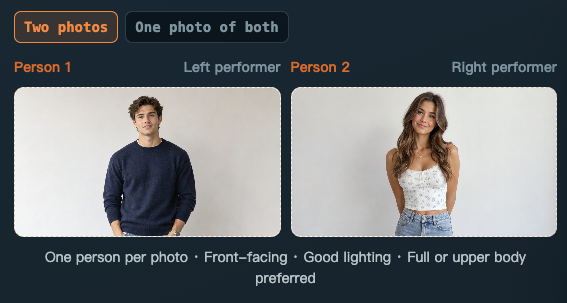
2. Choose the orange booth and add a personal detail
Select Hotel Lobby for the classic orange setting. Recording Studio, Street Cypher and Birthday Party are other available stages, but they change the setting. For this trend, keep Hotel Lobby even if the occasion is a birthday.
The song theme is separate from the stage. You can select Birthday and write: “Maya’s 30th birthday. We met at university and she always steals my fries.” Names, the occasion and one shared detail give the original rap something specific to refer to. The optional field allows 200 characters; it guides the lyrics rather than guaranteeing those exact words will be sung. Leave it empty for a general performance.
3. Pick settings, generate and review
Choose 9:16 for a vertical post or 16:9 for a landscape video. Available durations are 4, 10 and 15 seconds, with 480P or 720P quality. A 4-second 480P render costs 20 credits; a 10-second 720P render costs 100 credits. Check the cost on the generation button before continuing.
Sign in and generate. Generations use credits from your balance or one-time packs; there is no required subscription. Preview the completed video, listen to the rap and download the version you want to keep. Processing time varies; no fixed completion time is promised.
The performance direction has the left person start, the right person respond and both join in. The model can still alter facial details, positions or timing. This creates a new clip with original AI audio rather than an exact recreation of the artists’ movements or recording. For the full workflow, see how to make a Hotel Lobby AI video.
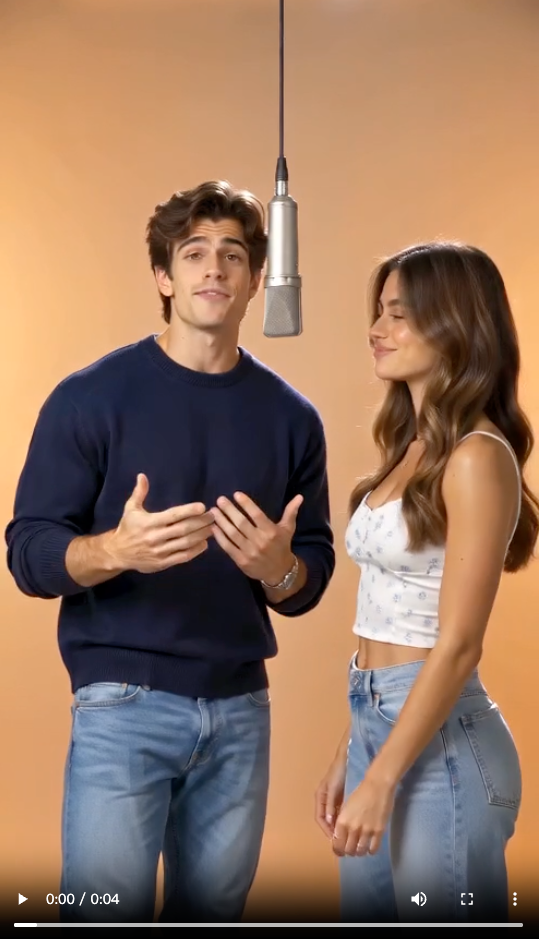
Which Workflow Fits Your Video?
| What you want | Which workflow to use |
|---|---|
| Reuse movement from a specific reference clip | Higgsfield Genjutsu Motion Transfer |
| Make a new orange-booth duo video from your photos | Hotel Lobby AI |
| Create an original rap about a birthday, friendship or business | Hotel Lobby AI with a song theme and personal details |
| Reproduce the exact original song and choreography | Hotel Lobby AI does not reproduce them |
Before You Share the Result
Use photos of yourself and people who agreed to participate; celebrity photos are not allowed on this site. Watch the whole clip for changing faces, awkward hands or an incorrect cast, then listen for unsuitable lyrics. Original AI audio does not guarantee that a social platform will accept every upload. If you add another soundtrack after download, check that track’s permitted use separately.
This guide is independent. Hotel Lobby AI is not affiliated with or endorsed by Higgsfield or the original artists.