Where to Find a Hotel Lobby CapCut Template
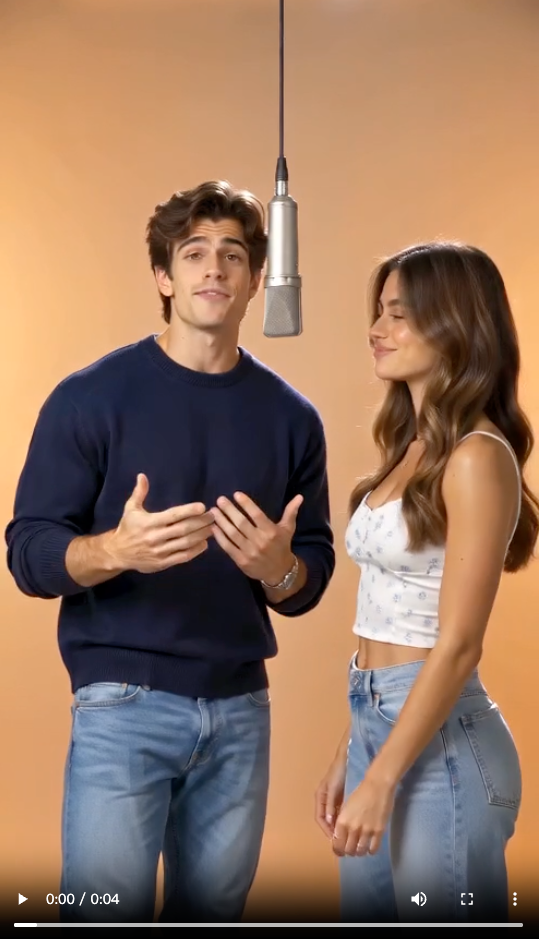
Start with the result you want: two people at microphones in an orange booth. A search for “Hotel Lobby” can also return music edits, slideshows or actual hotel videos. Choose by the preview, not just the name or popularity count.
Search inside the CapCut mobile app
Open CapCut, find Templates and search “Hotel Lobby”. Check each candidate’s preview and required media. Does it show the booth? Are both performers editable, or does it simply arrange your photos over music? CapCut’s official template search guide explains where to search.
Follow a CapCut template link from TikTok
Find a TikTok video showing the effect you want. If it includes a CapCut template link, follow it and open the template in the mobile app. A post without that link may have been made another way; seeing a Hotel Lobby video does not mean its creator shared an editable template.
How to Use the Template, Step by Step
- Open the preview — Check the effect and which photos or clips it needs.
- Select Use template — Fill the required media slots with your own pictures or footage.
- Review and adjust — Preview the result and correct crops or replace media where the template allows.
- Export your edit — Check any paid requirements, then save the completed video.
These steps follow CapCut’s official use and export instructions. For a TikTok-linked template, start on mobile; the same workflow may not be available in your desktop or browser version.
What a Template Can—and Can’t—Do
A template supplies a prepared edit. It may combine photos, transitions, effects and music; it is not automatically a face swap. The editable slots determine what you can change. Adding two photos to a slideshow is different from making both people perform together.
- Two people: inspect the result you can actually customize. Two media slots alone do not establish two editable performers.
- Personal lyrics: replacing images does not, by itself, write a rap about your friend or occasion.
- Audio: listen to the selected template rather than assuming it includes the original Hotel Lobby recording.
- Price: review the template and export requirements before investing time in the edit.
Can’t Find the Template or Open the Link?
A missing template does not necessarily mean it was deleted. CapCut lists region restrictions, older versions, account access and connection problems among the reasons templates may not appear. Update the app, check your connection and sign in if requested. Its missing-template help page covers these checks.
If the effect remains unavailable, choose a different preview or switch to the photo workflow below. You do not need to keep hunting for the exact button from someone else’s tutorial.
An Easier Way: Make the Duo Video from Photos
If your goal is you and a friend rapping in the booth, start with the people rather than an existing edit. Hotel Lobby AI generates a new performance with original rap audio in your browser.
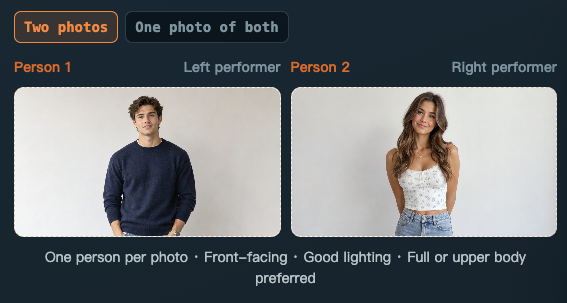
1. Add two portraits or one duo photo
Open the Hotel Lobby video maker. Use Two photos for separate portraits, with Person 1 directed to the left and Person 2 to the right. Use One photo of both for exactly two people side by side. Choose clear, evenly lit faces; JPG, PNG and WEBP files are supported up to 20 MB each. See the photo selection guide for examples of what to check.
2. Keep the orange booth and personalize the rap
Select the Hotel Lobby stage. For a birthday, choose the Birthday song theme and add a detail such as “Nina turns 30. We met at college and still argue about who makes the best coffee.” The optional field accepts up to 200 characters and guides original lyrics; it does not guarantee those exact words will be sung.
3. Generate, listen and download
Choose 4, 10 or 15 seconds, 480P or 720P, and 9:16 or 16:9. Check the credit cost on the button before generating. Renders use your balance or one-time credit packs, without a required subscription.
Preview both faces and listen to the rap before downloading. Processing time and generated details can vary. This creates an original performance rather than reproducing the artists’ recording or exact choreography. The complete Hotel Lobby AI tutorial explains the workflow.
Which Way Should You Choose?
| What you want | Which way to use |
|---|---|
| Use a ready-made edit you already like | A CapCut template, after checking its editable slots |
| You and a friend performing in the orange booth | Hotel Lobby AI from portraits or a duo photo |
| An original rap about a birthday or friendship | Hotel Lobby AI with a theme and personal details |
| Add captions or finishing edits to your generated clip | Generate the video, then edit the download in CapCut |
Tips Before You Share
Use clear photos of yourself and people who agreed to participate; celebrity photos are not allowed on this site. Choose 9:16 for a vertical post and watch the entire preview for changing faces or awkward movement. Check the final audio too. Original AI audio is not a guarantee of platform acceptance.
Need a direction for the lyrics? Browse Hotel Lobby video ideas for friends and couples. This guide is independent and is not affiliated with CapCut or the original artists. CapCut instructions were checked on October 7, 2026; no specific orange-booth template export was tested.